Thinking of migrating your WordPress site to a headless content management system (CMS)? It’s a decision that comes with its fair share of considerations. From ensuring seamless data migration to evaluating the benefits of a headless CMS, there’s a lot to think about. In this article, we’ll explore the key considerations you should keep in mind before taking the plunge. So, buckle up and get ready to uncover the ins and outs of migrating your WordPress site to a headless CMS.
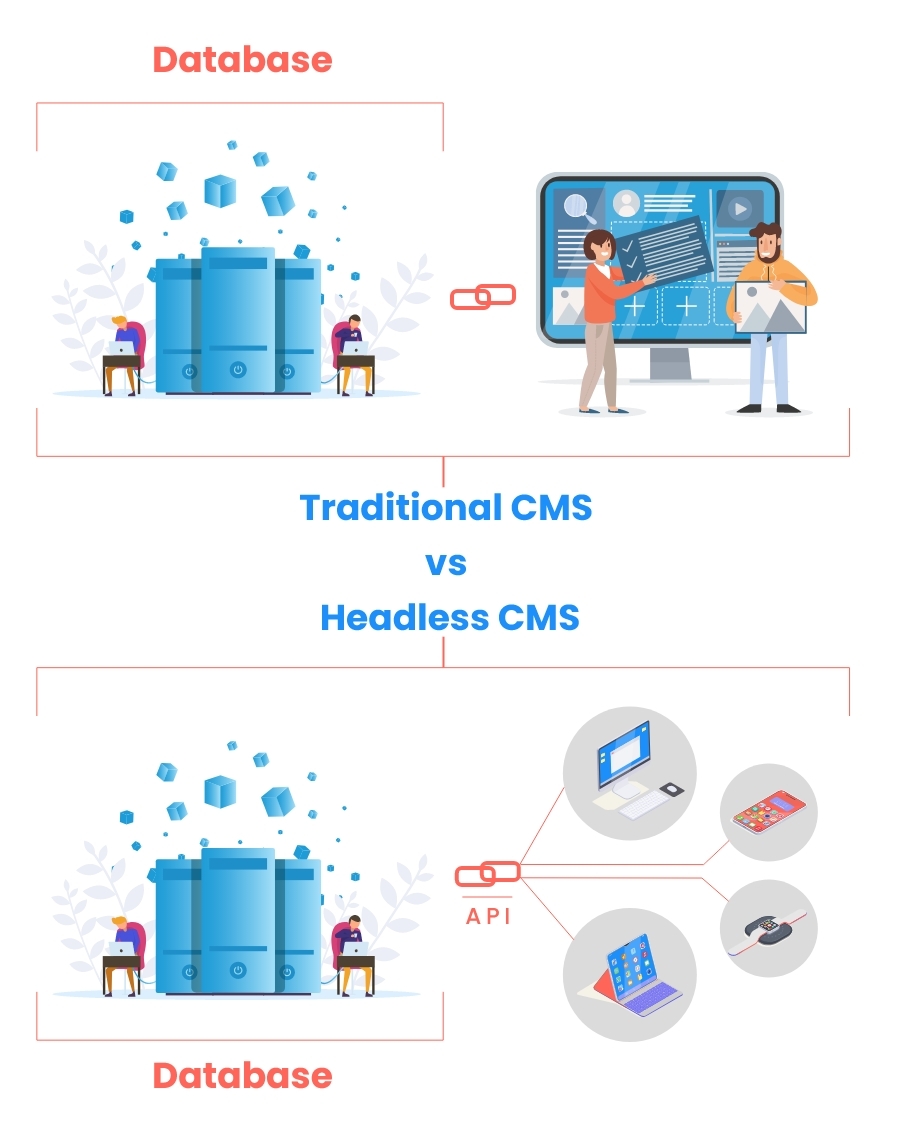
Choosing the Right Headless CMS
Choosing the right Headless CMS for your WordPress site migration is a crucial decision that will impact the success and efficiency of your project. Before diving into the migration process, it’s important to identify the specific needs and requirements of your website. Consider factors such as the complexity of your content, the number of users and editors, and your plans for future growth and scalability.
Once you have a clear understanding of your requirements, it’s time to evaluate the available options. There are numerous Headless CMS platforms in the market, each with its own strengths and weaknesses. Take the time to research and compare different CMSs, considering factors such as ease of use, customization options, the support community, and integration capabilities.
Flexibility and scalability are also important considerations when choosing a Headless CMS. Ensure that the CMS you choose can adapt to your changing needs and allows you to easily scale your website as your business grows. Look for features such as content modeling, API capabilities, and multi-channel publishing that offer flexibility in managing and delivering content across various platforms and devices.
Additionally, assessing the ease of management and maintenance of the Headless CMS is crucial. Consider the user interface and administrative tools provided by the CMS, as well as the level of technical expertise required to manage and maintain the platform. A CMS that offers a user-friendly interface and provides robust support will streamline your website management tasks and reduce the burden on your technical team.
Planning the Migration Process
Before diving into the migration process, it’s essential to conduct a thorough site audit. This audit will help you understand the current structure and architecture of your WordPress website, including content types, plugins, customizations, and dependencies. It will also reveal any potential challenges or issues that may arise during the migration process.
With a clear understanding of your current WordPress architecture, you can then define the goals and objectives of the migration. Specify what aspects of the current website you want to preserve and what improvements or changes you want to make in the new Headless CMS. Creating a detailed migration plan that outlines the steps, timeline, and responsibilities will ensure a smooth and successful transition.

Content Migration
Content migration is a critical phase of the WordPress to Headless CMS migration process. Start by identifying and prioritizing your content types. Determine which content elements are essential for your website and organize them based on their importance and complexity. This will help you allocate resources and prioritize the migration efforts.
Converting the content from WordPress to the appropriate format for the new CMS is the next step. Depending on the Headless CMS you choose, you may need to restructure or reformat your content. Ensure that the metadata, images, videos, and other assets associated with your content are properly migrated to maintain data integrity and consistency.
Handling media and file dependencies is also crucial during the content migration process. Identify any media files or external dependencies that are linked to your content and ensure that they are properly transferred or integrated into the new CMS. This will prevent broken links or missing media files on your new website.
Preserving SEO Ranking
Preserving your SEO ranking should be a top priority during the migration process. Implementing appropriate redirects is crucial to redirect users and search engines to the new URLs of your content. This will prevent loss of traffic and ensure a smooth transition for your users.
Maintaining the URL structure and permalinks is also important for SEO. Try to keep the same URL structure as much as possible to ensure that your existing backlinks and search engine rankings remain intact.
Optimizing metadata and keyword usage is another aspect of preserving your SEO ranking. Review and update the metadata, including page titles, descriptions, and headers, to ensure they align with the new CMS’s best practices. Conduct keyword research to identify relevant keywords for your content and incorporate them strategically into your new website.
Finally, update your sitemaps and submit them to search engines. This will help search engines crawl and index your new website effectively, ensuring that your content continues to appear in search engine results.

Design and Frontend Considerations
Adapting the frontend of your website to the new structure of the Headless CMS is essential for a seamless user experience. Take stock of your existing design elements and identify any changes or adjustments needed to align with the new CMS’s capabilities and requirements. This may involve redesigning templates, layouts, or user interface elements.
Implementing a flexible and reusable design system will greatly benefit your website in the long run. This will allow you to easily adapt and update your website’s design as your business evolves without significant development efforts. A design system also ensures consistency across different sections and pages of your website, improving the overall user experience.
Optimizing for mobile and responsive layouts is crucial in today’s mobile-first world. Ensure that your website is fully responsive and will adapt seamlessly to different screen sizes and devices. Pay attention to performance optimization on mobile devices to ensure fast loading times and optimal user experience.
Lastly, prioritize accessibility and usability during the design and frontend considerations. Ensure your website meets accessibility standards, such as WCAG 2.1 guidelines, to accommodate users with disabilities. Conduct user testing and gather feedback to identify any usability issues and make improvements in the design and frontend implementation of your website.
Third-Party Integrations and Plugins
Identifying essential integrations and plugins is vital to ensure that your new Headless CMS meets your specific requirements. Evaluate the compatibility of these integrations and plugins with the new CMS. Some may have native integrations available while others may require custom development or alternative solutions. Consider the impact on your website’s functionality and determine if any replacements or workarounds are needed.
Thoroughly test and validate the integrations to ensure they work seamlessly with your new CMS. Any broken or dysfunctional integrations can disrupt your website’s functionality and user experience.
Performance and Speed Optimization
Optimizing the performance and speed of your website is crucial for user satisfaction and SEO ranking. Streamline backend and server-side processes to minimize the server load and reduce response times. Implement caching mechanisms to store and deliver frequently accessed data more efficiently, reducing the server’s workload and improving response times.
Optimize image and asset delivery to improve the website’s loading speed. Compress and resize images to reduce file sizes without compromising quality. Utilize lazy loading techniques to load images and assets only when they are visible on the user’s screen, minimizing the initial load time.
Regularly test your website for performance bottlenecks using tools like PageSpeed Insights or GTmetrix. Address any issues or optimizations highlighted by these tools to ensure your website performs optimally.
Security and Data Protection
When migrating to a new CMS, assessing the security features of the new platform is crucial. Ensure the Headless CMS provides robust security measures, such as encryption, user authentication, and authorization controls. Protecting your website and user data should be a top priority.
Implement secure authentication and authorization controls to prevent unauthorized access to your website’s backend. Utilize strong passwords, two-factor authentication, and restricted access permissions for admins and editors.
Ensure secure data transmission by implementing encryption measures such as SSL certificates and HTTPS protocols. This will protect data transferred between your website and users, preventing unauthorized interception or tampering.
Regularly monitor and update security measures to stay ahead of potential vulnerabilities and exploits. Keep your CMS, plugins, and any third-party integrations up to date to patch any security vulnerabilities as soon as they are discovered.
Training and Support
Providing training for content editors and administrators is essential for a smooth transition to the new CMS. Conduct training sessions or create documentation that explains the new CMS processes and workflows. Ensure that your team understands how to create, manage, and publish content using the new CMS effectively.
Offer ongoing technical support to address any questions or issues that may arise during the transition and beyond. This can include providing a dedicated support team, setting up a knowledge base or community forum, or offering email or phone support.
Encourage user feedback and improvements to continuously enhance the usability and functionality of your website. Actively listen to your users and involve them in the improvement processes, whether through surveys, feedback forms, or user testing sessions.
Testing and Quality Assurance
Conducting comprehensive testing at each stage of the migration process is crucial. Test the migration process itself to ensure that content is migrated correctly and that data integrity is maintained. Perform cross-browser and device compatibility checks to ensure that your website functions properly on different browsers and devices.
Validate website functionality and the user experience to ensure that all features and interactions work as intended. Test forms, navigation menus, search functionality, and any custom features or functionalities implemented on your website.
Address any bugs or issues that arise during testing promptly. Debug and fix any technical issues, broken links, or visual inconsistencies to ensure a seamless and error-free user experience.
By following these considerations and implementing them throughout the migration process, you can ensure a successful transition from WordPress to a Headless CMS. Planning, preparation, and attention to detail are key to creating a seamless and optimized website on your new CMS platform.